在内网环境使用VMware虚拟机安装GitLab,实现内网畅通访问
概述
单位服务器不允许直接使用Ubuntu,所以使用VMware虚拟机安装Ubuntu,然后放置在windows server2016服务器中,内网环境无外网,最终实现内网ip访问,以下主要介绍VMware桥接网络配置。

备注:需要使用3个固定IP 服务器、vm、ubuntu
使用环境情况
windows server2016 (虚拟机放置)
VMware workstation 12 Pro
UIbuntu 24.07(GitLab 服务器)
tips:需要现在有外网的环境安装配置好GitLab,并安装net包,用于后续网络测试
网络配置
vmware 虚拟机设置
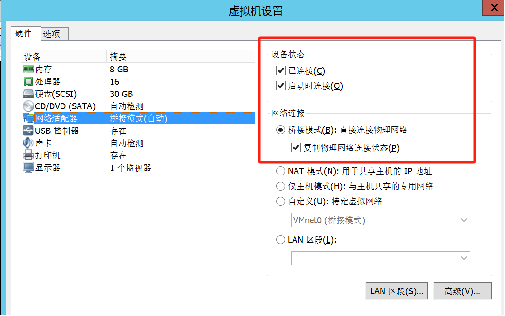
虚拟网络编辑设置

依次设置
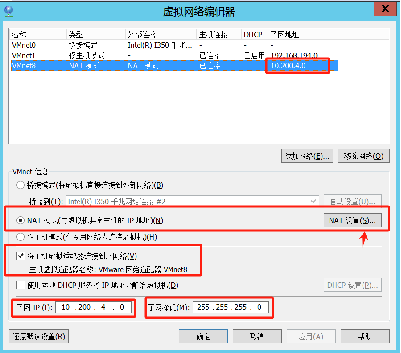
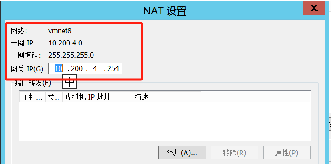
服务器中->虚拟机网络VMnet8设置
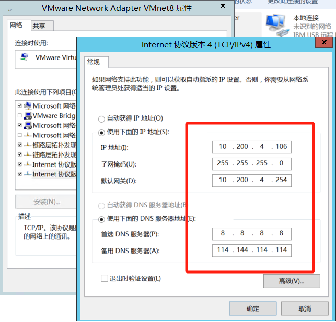
ubuntu网络设置
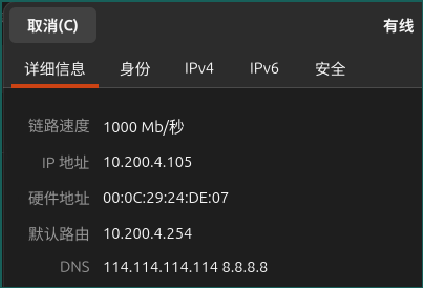
GitLab设置
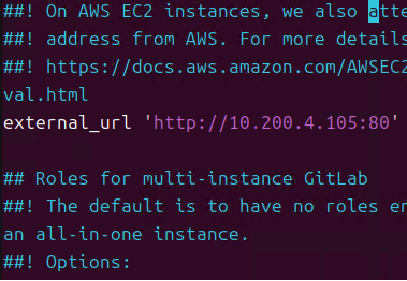
1 | #修改GitLab 网络配置文件 |
测试
ubuntu使用ping 访问服务器ip
服务器ping ubuntu
个人pc ping ubuntu
123都能联通说明网络配置没有问题。
GitLab常用命令
gitlab的管理
关闭gitlab: # gitlab-ctl stop 启动gitlab: # gitlab-ctl start 重启gitlab: # gitlab-ctl restart
You need to set
install_url to use ShareThis. Please set it in _config.yml.